




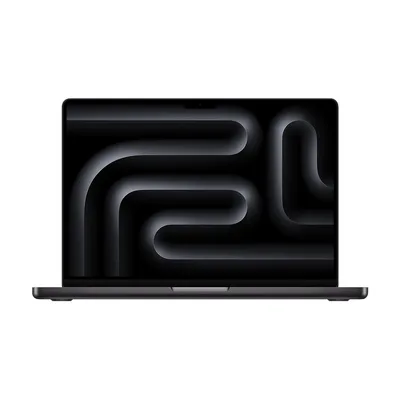
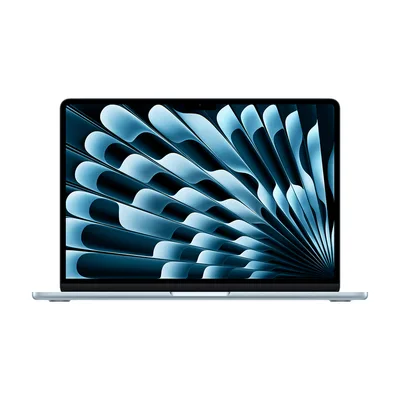
Choose the MacBook Pro 14 if…
- you run long jobs like big data sets in Excel
- you spend long stretches away from an outlet
- you plug into TVs, projectors or monitors
- you edit video or work in 3D
Laptop Finder
By use
By price
By size
By type
Brands
Most people will be happier with the MacBook Pro 14: its fan lets it hold full speed on long jobs, its battery lasts longer, and it has HDMI and an SD card reader. The MacBook Air 13 is still the one to pick if you want a laptop that is easier to carry.
Most people will be happier with the MacBook Pro 14: its fan lets it hold full speed on long jobs, its battery lasts longer, and it has HDMI and an SD card reader. The MacBook Air 13 is still the one to pick if you want a laptop that is easier to carry.
It's a trade-off: the MacBook Air 13 if you want one that's lighter to carry and that has no fan, the MacBook Pro 14 if you want more, because its fan lets it hold full speed on long jobs, its battery lasts longer and it has more memory.
We earn a commission from qualifying Amazon purchases made through our links, at no extra cost to you. This never affects our specs. How we make money.
This comparison starts with each model's base configuration. Pick the ones you're considering and the whole page compares exactly those.
| Spec | MacBook Pro 14 | MacBook Air 13 |
|---|---|---|
| Memory | 16 GB |
Dashed options are sold in another configuration. Picking one switches the other specs to match.
They share the Apple M5 chip, but the MacBook Pro 14 has a fan and the MacBook Air 13 is fanless. On short tasks the processor runs the same in both. On long, heavy ones, the MacBook Air 13 throttles to keep cool, while the MacBook Pro 14 holds its speed.
The MacBook Air 13 weighs 2.7 lb (1.23 kg) and the MacBook Pro 14 3.4 lb (1.55 kg), enough of a difference to feel on a daily commute.
The MacBook Pro 14 is rated for 24 hours and the MacBook Air 13 for 18. Those are the makers' best-case numbers, so expect fewer hours from both.
Only the MacBook Pro 14 has HDMI and an SD card reader, so you can hook up a TV or monitor and pull photos straight off a camera card.
The MacBook Pro 14's chip has a 10-core GPU to the 8 cores in the MacBook Air 13, so video exports, 3D work and games run faster.
With no fan, the MacBook Air 13 makes no fan noise, while the MacBook Pro 14's fan can be heard on long, heavy jobs.
They share the Apple M5 chip, but the MacBook Pro 14 has a fan and the MacBook Air 13 is fanless. On short tasks the processor runs the same in both. On long, heavy ones, the MacBook Air 13 throttles to keep cool, while the MacBook Pro 14 holds its speed.
The MacBook Air 13 weighs 2.7 lb (1.23 kg) and the MacBook Pro 14 3.4 lb (1.55 kg), a gap you'll notice if it rides in your bag every day.
The MacBook Pro 14 is rated for 24 hours and the MacBook Air 13 for 18. Those are the makers' best-case numbers, so expect fewer hours from both.
The MacBook Pro 14 comes with 24 GB of memory to the MacBook Air 13's 16 GB, which matters once you keep lots of apps, tabs or big files open.
Only the MacBook Pro 14 has HDMI and an SD card reader, so you can hook up a TV or monitor and pull photos straight off a camera card.
With no fan, the MacBook Air 13 makes no fan noise, while the MacBook Pro 14's fan can be heard on long, heavy jobs.
Both run macOS and use the Apple M5, so they compete for the same kind of buyer. What separates them is the graphics card, sustained speed and weight.
| Specification | MacBook Pro 14 | MacBook Air 13 |
|---|---|---|
| Performance | ||
| The MacBook Pro 14 has a 1 TB drive and the MacBook Air 13 a 512 GB one. The bigger drive saves you from juggling files between the laptop, the cloud and a USB drive. | ||
| Processor | Apple M5 | Apple M5 |
| CPU cores | 10 | 10 |
| Core types | 4 performance + 6 efficiency | 4 performance + 6 efficiency |
| Manufacturing process | 3nm | 3nm |
| Memory bandwidth | 153 GB/s | 153 GB/s |
| Graphics | Apple M5 10-core GPU | Apple M5 8-core GPU |
| Memory (RAM) | 16 GB | 16 GB |
| Storage | 1 TB | 512 GB |
| Storage type | SSD | — |
| Screen | ||
| The MacBook Pro 14's display is brighter, 1000 nits to 500, which makes it easier to read next to a window or outside. | ||
| Screen size | 14.2" | 13.6" |
| Resolution | 3K (3024 x 1964) | 2.5K (2560 x 1664) |
| Refresh rate | 120 Hz | — |
| Brightness | 1,000 nits | 500 nits |
| Panel | — | IPS |
| Color range | — | Wide color (P3) |
| Battery and size | ||
| Battery life (maker claim) | Up to 24 hours | Up to 18 hours |
| Battery capacity | 72.4 Wh | 53.8 Wh |
| Charges via | MagSafe 3 | MagSafe 3 |
| Weight | 1.55 kg (3.4 lb) | 1.23 kg (2.7 lb) |
| Dimensions | 312.7 x 221.2 x 15.5 mm (12.31 x 8.71 x 0.61 in) | 304.1 x 215 x 11.3 mm (11.97 x 8.46 x 0.44 in) |
| Color | Space Black | Silver |
| Colors available | Space Black | Silver |
| Charger | — | 40 W |
| Fast charging | — | Fast-charge capable with 70W or higher USB PD power source |
| Ports and wireless | ||
| The MacBook Air 13 has Wi-Fi 7 and the MacBook Pro 14 Wi-Fi 6E. It's a small edge that only pays off with a router that supports it. | ||
| Ports | 3x Thunderbolt 4, MagSafe 3, SDXC card slot, HDMI, headphone jack | 2x Thunderbolt 4 (USB-C), MagSafe 3, 3.5 mm headphone jack |
| Thunderbolt / USB4 | Thunderbolt 4 | Thunderbolt 4 (up to 40Gb/s), USB 4 (up to 40Gb/s) |
| External displays (max) | 2 | 2 |
| Card reader | SDXC | — |
| Wi-Fi | Wi-Fi 6E | Wi-Fi 7 |
| Bluetooth | Bluetooth 5.3 | Bluetooth 6 |
| Wi-Fi card | — | Apple N1 |
| Features | ||
| Webcam | 12MP Center Stage | 1080p |
| Backlit keyboard | Yes | Yes |
| Login | Fingerprint | Fingerprint |
| Touchpad | Force Touch trackpad | Force Touch trackpad |
| Speakers | six speakers with Spatial Audio and support for Dolby Atmos | Four-speaker sound system with Dolby Atmos support for Spatial Audio |
| Microphones | three studio-quality mics | Three-mic array with directional beamforming |
| Keyboard | — | Backlit Magic Keyboard, 78 (ANSI) or 79 (ISO) keys including 12 full-height function keys |
| Software and model | ||
| The MacBook Air 13 was released in 2026 and the MacBook Pro 14 in 2025. Newer models tend to get driver and security updates for longer. | ||
| Operating system | macOS | macOS |
| Released | 2025 | 2026 |
Both run macOS and use the Apple M5, so they'll appeal to similar buyers. What separates them is memory, sustained speed and weight.
| Specification | MacBook Pro 14 | MacBook Air 13 |
|---|---|---|
| Performance | ||
| The MacBook Pro 14 has a 1 TB drive and the MacBook Air 13 a 512 GB one. The bigger drive saves you from juggling files between the laptop, the cloud and a USB drive. | ||
| Processor | Apple M5 | Apple M5 |
| CPU cores | 10 | 10 |
| Core types | 4 performance + 6 efficiency | 4 performance + 6 efficiency |
| Manufacturing process | 3nm | 3nm |
| Memory bandwidth | 153 GB/s | 153 GB/s |
| Graphics | — | Apple M5 8-core GPU |
| Memory (RAM) | 24 GB | 16 GB |
| Storage | 1 TB | 512 GB |
| Storage type | SSD | — |
| Screen | ||
| The MacBook Pro 14's display is brighter, 1000 nits to 500, which makes it easier to read next to a window or outside. | ||
| Screen size | 14.2" | 13.6" |
| Resolution | 3K (3024 x 1964) | 2.5K (2560 x 1664) |
| Refresh rate | 120 Hz | — |
| Brightness | 1,000 nits | 500 nits |
| Panel | — | IPS |
| Color range | — | Wide color (P3) |
| Battery and size | ||
| Battery life (maker claim) | Up to 24 hours | Up to 18 hours |
| Battery capacity | 72.4 Wh | 53.8 Wh |
| Charges via | MagSafe 3 | MagSafe 3 |
| Weight | 1.55 kg (3.4 lb) | 1.23 kg (2.7 lb) |
| Dimensions | 312.6 x 221.2 x 15.5 mm (12.31 x 8.71 x 0.61 in) | 304.1 x 215 x 11.3 mm (11.97 x 8.46 x 0.44 in) |
| Color | Space Black | Silver |
| Colors available | Space Black | Silver |
| Charger | — | 40 W |
| Fast charging | — | Fast-charge capable with 70W or higher USB PD power source |
| Ports and wireless | ||
| The MacBook Air 13 has Wi-Fi 7 and the MacBook Pro 14 Wi-Fi 6E. The newer standard is faster on a newer router. | ||
| Ports | 3x Thunderbolt 4, MagSafe 3, SDXC card slot, HDMI, headphone jack | 2x Thunderbolt 4 (USB-C), MagSafe 3, 3.5 mm headphone jack |
| Thunderbolt / USB4 | Thunderbolt 4 | Thunderbolt 4 (up to 40Gb/s), USB 4 (up to 40Gb/s) |
| External displays (max) | 2 | 2 |
| Card reader | SDXC | — |
| Wi-Fi | Wi-Fi 6E | Wi-Fi 7 |
| Bluetooth | Bluetooth 5.3 | Bluetooth 6 |
| Wi-Fi card | — | Apple N1 |
| Features | ||
| Webcam | 12MP Center Stage | 1080p |
| Backlit keyboard | Yes | Yes |
| Login | Fingerprint | Fingerprint |
| Touchpad | Force Touch trackpad | Force Touch trackpad |
| Speakers | six speakers with Spatial Audio and support for Dolby Atmos | Four-speaker sound system with Dolby Atmos support for Spatial Audio |
| Microphones | three studio-quality mics | Three-mic array with directional beamforming |
| Keyboard | — | Backlit Magic Keyboard, 78 (ANSI) or 79 (ISO) keys including 12 full-height function keys |
| Software and model | ||
| The MacBook Air 13 was released in 2026 and the MacBook Pro 14 in 2025. The newer one usually has more years of maker support left. | ||
| Operating system | macOS | macOS |
| Released | 2025 | 2026 |