




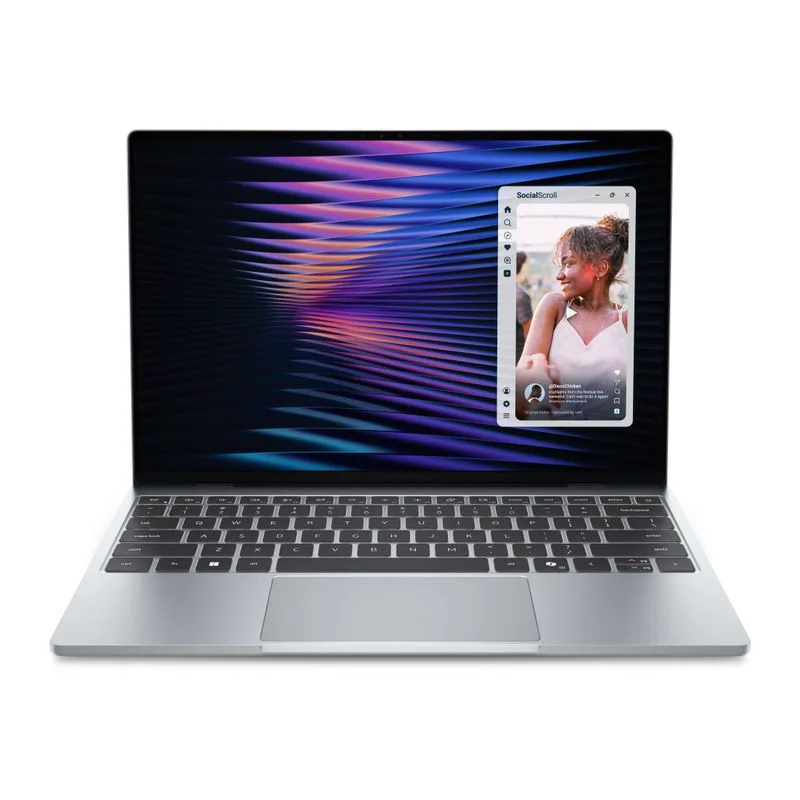
Image source: DELL
Dell XPS 13 (DX13260)
- Processor
- Intel Core 5 320
- Everyday speed
- Smooth everyday multitasking
- Graphics
- Intel Graphics
- Gaming
- Not built for gaming
- Memory
- 8 GB
- Storage
- 256 GB SSD
- Screen
- 13.4" 2.5K 120Hz
- Operating system
- Windows 11 Home
Showing: Intel Core 5 320 · 8 GB · 256 GB · 4 other configurations
Colors: Sky, Storm, other Dell offers, same hardware: dx13260_fixed_64, other Dell offers, same hardware: dx13260_so_38, other Dell offers, same hardware: dx13260_fixed_61
- Processor
- Intel Core 5 320
- Everyday speed
- Smooth everyday multitasking
- Graphics
- Intel Graphics
- Gaming
- Not built for gaming
- Memory
- 8 GB
- Storage
- 512 GB SSD
- Screen
- 13.4" 2.5K 120Hz
- Operating system
- Windows 11 Home
Showing: Intel Core 5 320 · 8 GB · 512 GB · Back to the base configuration
Colors: Sky, Storm, other Dell offers, same hardware: dx13260_fixed_64, other Dell offers, same hardware: dx13260_so_38, other Dell offers, same hardware: dx13260_fixed_61
- Processor
- Intel Core 5 320
- Everyday speed
- Smooth everyday multitasking
- Graphics
- Intel Graphics
- Gaming
- Not built for gaming
- Memory
- 16 GB
- Storage
- 512 GB SSD
- Screen
- 13.4" 2.5K 120Hz
- Operating system
- Windows 11 Home
Showing: Intel Core 5 320 · 16 GB · 512 GB · Back to the base configuration
Colors: Sky, Storm, other Dell offers, same hardware: dx13260_fixed_64, other Dell offers, same hardware: dx13260_so_38, other Dell offers, same hardware: dx13260_fixed_61
- Processor
- Intel Core Ultra 7 355
- Everyday speed
- Handles photo and video editing
- Graphics
- Intel Graphics
- Gaming
- Light and older games
- Memory
- 16 GB
- Storage
- 1 TB SSD
- Screen
- 13.4" 2.5K 120Hz
- Operating system
- Windows 11 Home
Showing: Intel Core Ultra 7 355 · 16 GB · 1 TB · Back to the base configuration
Colors: Sky, Storm, other Dell offers, same hardware: dx13260_fixed_64, other Dell offers, same hardware: dx13260_so_38, other Dell offers, same hardware: dx13260_fixed_61
- Processor
- Intel Core Ultra 7 355
- Everyday speed
- Handles photo and video editing
- Graphics
- Intel Graphics
- Gaming
- Light and older games
- Memory
- 32 GB
- Storage
- 1 TB SSD
- Screen
- 13.4" 2.5K 120Hz
- Operating system
- Windows 11 Home
Showing: Intel Core Ultra 7 355 · 32 GB · 1 TB · Back to the base configuration
Colors: Sky, Storm, other Dell offers, same hardware: dx13260_fixed_64, other Dell offers, same hardware: dx13260_so_38, other Dell offers, same hardware: dx13260_fixed_61
We earn a commission from qualifying Amazon purchases made through our links, at no extra cost to you. This never affects our specs. How we make money.
Choose a configuration
The Dell XPS 13 (DX13260) is sold in 5 configurations. Pick the specs you want and the whole page switches to that configuration.
Dashed options are sold in another configuration. Picking one switches the other specs to match.
| Processor | Memory | Storage | Part number | Actions |
|---|---|---|---|---|
| Intel Core 5 320 | 8 GB | 256 GB | — | Check current price (opens Amazon in a new tab) |
| Intel Core 5 320 | 8 GB | 512 GB | dx13260_so_13 | Check current price (opens Amazon in a new tab) |
| Intel Core 5 320 | 16 GB | 512 GB | dx13260_fixed_62 | Check current price (opens Amazon in a new tab) |
| Intel Core Ultra 7 355 | 16 GB | 1 TB | — | Check current price (opens Amazon in a new tab) |
| Intel Core Ultra 7 355 | 32 GB | 1 TB | dx13260_so_32 | Check current price (opens Amazon in a new tab) |
Dell XPS 13 (DX13260) at a glance
-
Performance
Pick the power you need
It comes with the Core 5 320 or Core Ultra 7 355. The Core 5 320 runs office apps and video calls smoothly, while the Core Ultra 7 355 handles demanding work like coding or photo editing. The 8 GB configurations run short of memory once lots of tabs are open.
-
Who it suits
Everyday work and school
Documents, video calls and browsing at home, in class or at the office.
-
Screen
A crisp display
Its pixel density beats 86% of the laptops we list, which keeps small text and photos looking clean.
-
Screen
A touchscreen
You can tap, scroll and zoom right on the display, which is quicker than the trackpad for some jobs.
-
Performance
Pick the power you need
It comes with the Core 5 320 or Core Ultra 7 355. The Core 5 320 runs office apps and video calls smoothly, while the Core Ultra 7 355 handles demanding work like coding or photo editing. The 8 GB configurations run short of memory once lots of tabs are open.
-
Who it suits
Everyday work and school
Documents, video calls and browsing at home, in class or at the office.
-
Screen
A crisp display
Its pixel density beats 86% of the laptops we list, which keeps small text and photos looking clean.
-
Screen
A touchscreen
You can tap, scroll and zoom right on the display, which is quicker than the trackpad for some jobs.
Dell XPS 13 (DX13260) full specifications
For the configuration with Intel Core 5 320 · 8 GB · 256 GB. Change configuration
For the configuration with Intel Core 5 320 · 8 GB · 256 GB. Change configuration
For the configuration with Intel Core 5 320 · 8 GB · 512 GB. Change configuration
For the configuration with Intel Core 5 320 · 16 GB · 512 GB. Change configuration
For the configuration with Intel Core Ultra 7 355 · 16 GB · 1 TB. Change configuration
For the configuration with Intel Core Ultra 7 355 · 32 GB · 1 TB. Change configuration
Performance
This configuration has the Intel Core 5 320. The processor has more speed than everyday work asks for. Its 8 GB of memory handles a few tabs and an office app at once, and it's soldered, so it stays at that amount. The 256 GB SSD covers apps and documents, though a photo library will fill it.
| Processor | Intel Core 5 320Other configurations: Intel Core Ultra 7 355 |
|---|---|
| CPU cores | 6 |
| Core types | 2 performance + 4 low-power efficiency |
| Threads | 6 |
| Base clock | 1.5 GHz |
| Max boost clock | 4.6 GHz |
| Cache | 6 MB |
| Processor base power | 15 W |
| Manufacturing process | Intel 18A |
| Graphics | Intel Graphics |
| Memory (RAM) | 8 GBOther configurations: 16 GB, 32 GB |
| Memory type | LPDDR5x-7467 |
| Memory upgrades | Soldered (not upgradeable) |
| Storage | 256 GBOther configurations: 1 TB, 512 GB |
| Storage type | SSD |
| Storage interface | M.2 2230 Gen4x4 Essential |
Screen
The 13.4-inch display is sharper than 86% of the laptops we list, so text and photos look crisp. A 120Hz refresh rate makes scrolling and windows move smoothly. It responds to touch, too.
| Screen size | 13.4" |
|---|---|
| Resolution | 2.5K (2560 x 1600) |
| Aspect ratio | 16:10 |
| Refresh rate | 120 Hz |
| Variable refresh (VRR) | Yes |
| Brightness | 500 nits |
| Touchscreen | Yes |
Battery and size
| Battery capacity | 52 Wh |
|---|---|
| Charges via | USB-C |
| Dimensions | 296.9 x 200.66 x 12.7 mm (11.69 x 7.9 x 0.5 in) |
| Materials | CNC aluminum |
| Color | SkyOther configurations: Storm |
| Colors available | Sky |
Ports and wireless
It has Thunderbolt for a dock or external display. Wi-Fi 7 is there for the newest routers.
| Thunderbolt / USB4 | Thunderbolt 4 |
|---|---|
| Wi-Fi | Wi-Fi 7 |
| Wi-Fi card | Intel Wi-Fi 7 BE213 |
| Bluetooth | Bluetooth 6.0 |
Features
A backlit keyboard helps when you type with the lights low.
| Backlit keyboard | Yes |
|---|---|
| Keyboard | English (US) Backlit Keyboard |
| Number pad | No |
Software and model
It runs Windows 11 Home, which works with almost any program.
| Operating system | Windows 11 Home |
|---|
Performance
This configuration has the Intel Core 5 320. The processor has more speed than everyday work asks for. Its 8 GB of memory handles a few tabs and an office app at once, and it's soldered, so it stays at that amount. The 512 GB SSD covers apps, work files and a decent photo collection.
| Processor | Intel Core 5 320Other configurations: Intel Core Ultra 7 355 |
|---|---|
| CPU cores | 6 |
| Core types | 2 performance + 4 low-power efficiency |
| Threads | 6 |
| Base clock | 1.5 GHz |
| Max boost clock | 4.6 GHz |
| Cache | 6 MB |
| Processor base power | 15 W |
| Manufacturing process | Intel 18A |
| Graphics | Intel Graphics |
| Memory (RAM) | 8 GBOther configurations: 16 GB, 32 GB |
| Memory type | LPDDR5x-7467 |
| Memory upgrades | Soldered (not upgradeable) |
| Storage | 512 GBOther configurations: 1 TB, 256 GB |
| Storage type | SSD |
| Storage interface | Gen4x4 |
Screen
The 13.4-inch display is sharper than 86% of the laptops we list, so text and photos look crisp. A 120Hz refresh rate makes scrolling and windows move smoothly. It responds to touch, too.
| Screen size | 13.4" |
|---|---|
| Resolution | 2.5K (2560 x 1600) |
| Aspect ratio | 16:10 |
| Refresh rate | 120 Hz |
| Variable refresh (VRR) | Yes |
| Brightness | 500 nits |
| Touchscreen | Yes |
Battery and size
| Battery capacity | 52 Wh |
|---|---|
| Charges via | USB-C |
| Dimensions | 296.9 x 200.66 x 12.7 mm (11.69 x 7.9 x 0.5 in) |
| Materials | CNC aluminum |
| Color | StormOther configurations: Sky |
| Colors available | Sky, Storm |
Ports and wireless
It has Thunderbolt for a dock or external display. Wi-Fi 7 is there for the newest routers.
| Thunderbolt / USB4 | Thunderbolt 4 |
|---|---|
| Wi-Fi | Wi-Fi 7 |
| Wi-Fi card | Intel Wi-Fi 7 BE213 |
| Bluetooth | Bluetooth 6.0 |
Features
A backlit keyboard helps when you type with the lights low.
| Backlit keyboard | Yes |
|---|---|
| Keyboard | English (US) Backlit Keyboard |
| Number pad | No |
Software and model
It runs Windows 11 Home, which works with almost any program.
| Operating system | Windows 11 Home |
|---|
Performance
This configuration has the Intel Core 5 320. It juggles email, a video call and Microsoft 365 at once, which covers most office and school work. Its 16 GB of memory keeps dozens of tabs and a few apps open at once, and it's soldered, so it stays at that amount. The 512 GB SSD covers apps, work files and a decent photo collection.
| Processor | Intel Core 5 320Other configurations: Intel Core Ultra 7 355 |
|---|---|
| CPU cores | 6 |
| Core types | 2 performance + 4 low-power efficiency |
| Threads | 6 |
| Base clock | 1.5 GHz |
| Max boost clock | 4.6 GHz |
| Cache | 6 MB |
| Processor base power | 15 W |
| Manufacturing process | Intel 18A |
| Graphics | Intel Graphics |
| Memory (RAM) | 16 GBOther configurations: 32 GB, 8 GB |
| Memory type | LPDDR5x-7467 |
| Memory upgrades | Soldered (not upgradeable) |
| Storage | 512 GBOther configurations: 1 TB, 256 GB |
| Storage type | SSD |
| Storage interface | Gen4x4 |
Screen
The 13.4-inch display is sharper than 86% of the laptops we list, so text and photos look crisp. A 120Hz refresh rate makes scrolling and windows move smoothly. It responds to touch, too.
| Screen size | 13.4" |
|---|---|
| Resolution | 2.5K (2560 x 1600) |
| Aspect ratio | 16:10 |
| Refresh rate | 120 Hz |
| Variable refresh (VRR) | Yes |
| Brightness | 500 nits |
| Touchscreen | Yes |
Battery and size
| Battery capacity | 52 Wh |
|---|---|
| Charges via | USB-C |
| Dimensions | 296.9 x 200.66 x 12.7 mm (11.69 x 7.9 x 0.5 in) |
| Materials | CNC aluminum |
| Color | StormOther configurations: Sky |
| Colors available | Sky, Storm |
Ports and wireless
It has Thunderbolt for a dock or external display. Wi-Fi 7 is there for the newest routers.
| Thunderbolt / USB4 | Thunderbolt 4 |
|---|---|
| Wi-Fi | Wi-Fi 7 |
| Wi-Fi card | Intel Wi-Fi 7 BE213 |
| Bluetooth | Bluetooth 6.0 |
Features
A backlit keyboard helps when you type with the lights low.
| Backlit keyboard | Yes |
|---|---|
| Keyboard | English (US) Backlit Keyboard |
| Number pad | No |
Software and model
It runs Windows 11 Home, which works with almost any program.
| Operating system | Windows 11 Home |
|---|
Performance
This configuration has the Intel Core Ultra 7 355. It handles coding, big spreadsheets and photo editing well. Its 16 GB of memory keeps dozens of tabs and a few apps open at once, and it's soldered, so it stays at that amount. The 1 TB SSD fits a large photo library or several big games. There's also a configuration with 32 GB of memory, the one to pick for heavier apps or more at once.
| Processor | Intel Core Ultra 7 355Other configurations: Intel Core 5 320 |
|---|---|
| CPU cores | 8 |
| Core types | 4 performance + 4 low-power efficiency |
| Threads | 8 |
| Base clock | 2.3 GHz |
| Max boost clock | 4.7 GHz |
| Cache | 12 MB |
| Processor base power | 25 W |
| Manufacturing process | Intel 18A |
| Graphics | Intel Graphics |
| Memory (RAM) | 16 GBOther configurations: 32 GB, 8 GB |
| Memory type | LPDDR5x-7467 |
| Memory upgrades | Soldered (not upgradeable) |
| Storage | 1 TBOther configurations: 512 GB, 256 GB |
| Storage type | SSD |
| Storage interface | Gen4x4 |
Screen
The 13.4-inch display is sharper than 86% of the laptops we list, so text and photos look crisp. A 120Hz refresh rate makes scrolling and windows move smoothly. It responds to touch, too.
| Screen size | 13.4" |
|---|---|
| Resolution | 2.5K (2560 x 1600) |
| Aspect ratio | 16:10 |
| Refresh rate | 120 Hz |
| Variable refresh (VRR) | Yes |
| Brightness | 500 nits |
| Touchscreen | Yes |
Battery and size
| Battery capacity | 52 Wh |
|---|---|
| Charges via | USB-C |
| Dimensions | 296.9 x 200.66 x 12.7 mm (11.69 x 7.9 x 0.5 in) |
| Materials | CNC aluminum |
| Color | SkyOther configurations: Storm |
| Colors available | Sky |
Ports and wireless
It has Thunderbolt for a dock or external display. Wi-Fi 7 is there for the newest routers.
| Thunderbolt / USB4 | Thunderbolt 4 |
|---|---|
| Wi-Fi | Wi-Fi 7 |
| Wi-Fi card | Intel Wi-Fi 7 BE211 |
| Bluetooth | Bluetooth 6.0 |
Features
A backlit keyboard helps when you type with the lights low.
| Backlit keyboard | Yes |
|---|---|
| Keyboard | English (US) Backlit Keyboard |
| Number pad | No |
Software and model
It runs Windows 11 Home, which works with almost any program.
| Operating system | Windows 11 Home |
|---|
Performance
This configuration has the Intel Core Ultra 7 355. It handles coding, big spreadsheets and photo editing well. Its 32 GB of memory leaves plenty of room for big projects and lots of open apps, and it's soldered, so it stays at that amount. The 1 TB SSD fits a large photo library or several big games.
| Processor | Intel Core Ultra 7 355Other configurations: Intel Core 5 320 |
|---|---|
| CPU cores | 8 |
| Core types | 4 performance + 4 low-power efficiency |
| Threads | 8 |
| Base clock | 2.3 GHz |
| Max boost clock | 4.7 GHz |
| Cache | 12 MB |
| Processor base power | 25 W |
| Manufacturing process | Intel 18A |
| Graphics | Intel Graphics |
| Memory (RAM) | 32 GBOther configurations: 16 GB, 8 GB |
| Memory type | LPDDR5x-7467 |
| Memory upgrades | Soldered (not upgradeable) |
| Storage | 1 TBOther configurations: 512 GB, 256 GB |
| Storage type | SSD |
| Storage interface | Gen4x4 |
Screen
The 13.4-inch display is sharper than 86% of the laptops we list, so text and photos look crisp. A 120Hz refresh rate makes scrolling and windows move smoothly. It responds to touch, too.
| Screen size | 13.4" |
|---|---|
| Resolution | 2.5K (2560 x 1600) |
| Aspect ratio | 16:10 |
| Refresh rate | 120 Hz |
| Variable refresh (VRR) | Yes |
| Brightness | 500 nits |
| Touchscreen | Yes |
Battery and size
| Battery capacity | 52 Wh |
|---|---|
| Charges via | USB-C |
| Dimensions | 296.9 x 200.66 x 12.7 mm (11.69 x 7.9 x 0.5 in) |
| Materials | CNC aluminum |
| Color | SkyOther configurations: Storm |
| Colors available | Sky, Storm |
Ports and wireless
It has Thunderbolt for a dock or external display. Wi-Fi 7 is there for the newest routers.
| Thunderbolt / USB4 | Thunderbolt 4 |
|---|---|
| Wi-Fi | Wi-Fi 7 |
| Wi-Fi card | Intel Wi-Fi 7 BE211 |
| Bluetooth | Bluetooth 6.0 |
Features
A backlit keyboard helps when you type with the lights low.
| Backlit keyboard | Yes |
|---|---|
| Keyboard | English (US) Backlit Keyboard |
| Number pad | No |
Software and model
It runs Windows 11 Home, which works with almost any program.
| Operating system | Windows 11 Home |
|---|
Specs from Dell's published product information. Makers revise hardware between production runs, so check the part number before you buy. Spotted an error? Let us know.