




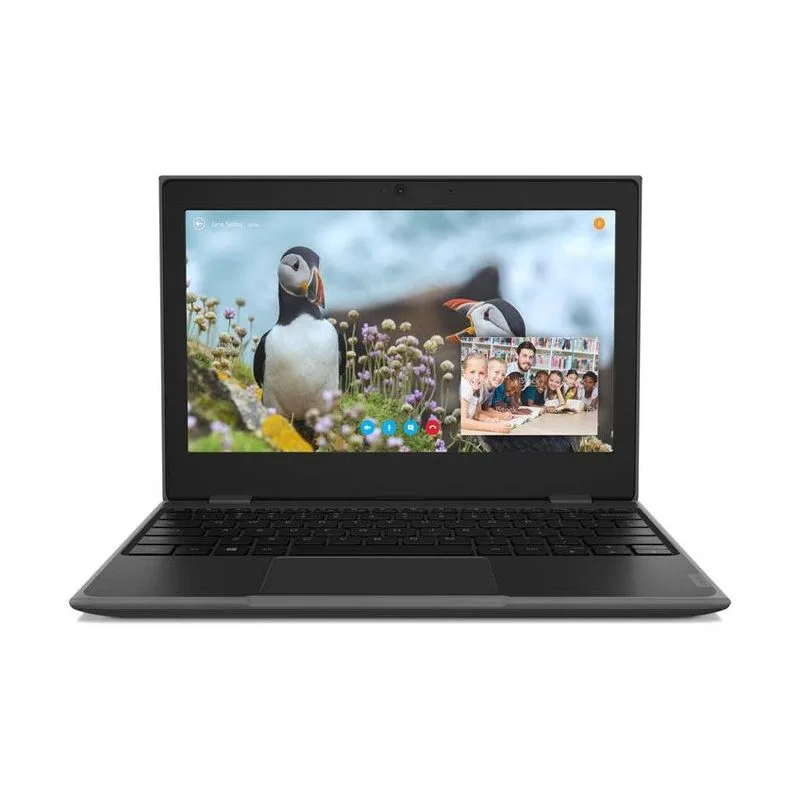
Image source: Lenovo
Lenovo 100e Windows (2nd Gen)
- Processor
- Intel Celeron N4020
- Everyday speed
- Fine for browsing and documents
- Graphics
- Intel UHD Graphics 600
- Gaming
- Not built for gaming
- Memory
- 4 GB
- Storage
- 64 GB eMMC
- Screen
- 11.6" HD TN
Showing: Intel Celeron N4020 · 4 GB · 64 GB · part 81M80035US · 6 other configurations
- Processor
- Intel Celeron N4000
- Everyday speed
- Fine for browsing and documents
- Graphics
- Intel UHD Graphics 600
- Gaming
- Not built for gaming
- Memory
- 4 GB
- Storage
- 64 GB eMMC
- Screen
- 11.6" HD TN
Showing: Intel Celeron N4000 · 4 GB · 64 GB · part 81M80003US · Back to the base configuration
- Processor
- Intel Celeron N4120
- Everyday speed
- Fine for browsing and documents
- Graphics
- Intel UHD Graphics 600
- Gaming
- Not built for gaming
- Memory
- 4 GB
- Storage
- 64 GB eMMC
- Screen
- 11.6" HD TN
Showing: Intel Celeron N4120 · 4 GB · 64 GB · part 81M80041US · Back to the base configuration
- Processor
- Intel Celeron N4000
- Everyday speed
- Fine for browsing and documents
- Graphics
- Intel UHD Graphics 600
- Gaming
- Not built for gaming
- Memory
- 4 GB
- Storage
- 128 GB eMMC
- Screen
- 11.6" HD TN
Showing: Intel Celeron N4000 · 4 GB · 128 GB · part 81M80005US · Back to the base configuration
- Processor
- Intel Celeron N4020
- Everyday speed
- Fine for browsing and documents
- Graphics
- Intel UHD Graphics 600
- Gaming
- Not built for gaming
- Memory
- 4 GB
- Storage
- 128 GB SSD
- Screen
- 11.6" HD TN
- Operating system
- Windows 11 Pro
Showing: Intel Celeron N4020 · 4 GB · 128 GB · part 81M80089US · Back to the base configuration
- Processor
- Intel Celeron N4120
- Everyday speed
- Fine for browsing and documents
- Graphics
- Intel UHD Graphics 600
- Gaming
- Not built for gaming
- Memory
- 4 GB
- Storage
- 128 GB SSD
- Screen
- 11.6" HD TN
- Operating system
- Windows 11 Pro
Showing: Intel Celeron N4120 · 4 GB · 128 GB · part 81M8008VUS · Back to the base configuration
- Processor
- Intel Celeron N4020
- Everyday speed
- Fine for browsing and documents
- Graphics
- Intel UHD Graphics 600
- Gaming
- Not built for gaming
- Memory
- 8 GB
- Storage
- 128 GB SSD
- Screen
- 11.6" HD TN
- Operating system
- Windows 11 Pro
Showing: Intel Celeron N4020 · 8 GB · 128 GB · part 81M8007EUS · Back to the base configuration
We earn a commission from qualifying Amazon purchases made through our links, at no extra cost to you. This never affects our specs. How we make money.
Choose a configuration
The Lenovo 100e Windows (2nd Gen) is sold in 7 configurations. Pick the specs you want and the whole page switches to that configuration.
Dashed options are sold in another configuration. Picking one switches the other specs to match.
| Processor | Memory | Storage | Part number | Actions |
|---|---|---|---|---|
| Intel Celeron N4020 | 4 GB | 64 GB | 81M80035US | Check current price (opens Amazon in a new tab) |
| Intel Celeron N4000 | 4 GB | 64 GB | 81M80003US | Check current price (opens Amazon in a new tab) |
| Intel Celeron N4120 | 4 GB | 64 GB | 81M80041US | Check current price (opens Amazon in a new tab) |
| Intel Celeron N4000 | 4 GB | 128 GB | 81M80005US | Check current price (opens Amazon in a new tab) |
| Intel Celeron N4020 | 4 GB | 128 GB | 81M80089US | Check current price (opens Amazon in a new tab) |
| Intel Celeron N4120 | 4 GB | 128 GB | 81M8008VUS | Check current price (opens Amazon in a new tab) |
| Intel Celeron N4020 | 8 GB | 128 GB | 81M8007EUS | Check current price (opens Amazon in a new tab) |
Lenovo 100e Windows (2nd Gen) at a glance
-
Performance
Web, email and documents
It manages web browsing and simple documents, and it slows once several things are open.
-
Who it suits
A basic home laptop
Email, homework, online shopping and streaming for the household.
-
Screen
Dim in a bright room
At 250 nits, it's dimmer than 78% of the laptops we list. Indoors it's fine, while daylight from a window makes it hard to read.
-
Webcam
720p webcam
Its 720p camera looks soft on calls next to a 1080p one. That's fine now and then, less so if you're on Zoom every day.
-
Performance
Web, email and documents
It manages web browsing and simple documents, and it slows once several things are open.
-
Who it suits
A basic home laptop
Email, homework, online shopping and streaming for the household.
-
Screen
Dim in a bright room
At 250 nits, it's dimmer than 78% of the laptops we list. Indoors it's fine, while daylight from a window makes it hard to read.
-
Webcam
720p webcam
Its 720p camera looks soft on calls next to a 1080p one. That's fine now and then, less so if you're on Zoom every day.
Lenovo 100e Windows (2nd Gen) full specifications
For the configuration with Intel Celeron N4020 · 4 GB · 64 GB · part 81M80035US. Change configuration
For the configuration with Intel Celeron N4020 · 4 GB · 64 GB · part 81M80035US. Change configuration
For the configuration with Intel Celeron N4000 · 4 GB · 64 GB · part 81M80003US. Change configuration
For the configuration with Intel Celeron N4120 · 4 GB · 64 GB · part 81M80041US. Change configuration
For the configuration with Intel Celeron N4000 · 4 GB · 128 GB · part 81M80005US. Change configuration
For the configuration with Intel Celeron N4020 · 4 GB · 128 GB · part 81M80089US. Change configuration
For the configuration with Intel Celeron N4120 · 4 GB · 128 GB · part 81M8008VUS. Change configuration
For the configuration with Intel Celeron N4020 · 8 GB · 128 GB · part 81M8007EUS. Change configuration
Performance
This configuration has the Intel Celeron N4020. It manages web browsing and simple documents, and it slows once several things are open. The 4 GB of memory only covers light browsing, and since it's soldered to the board, you can't add more. The 64 GB drive fills up fast, so you'll lean on cloud storage for photos and files.
| Processor | Intel Celeron N4020Other configurations: Intel Celeron N4000, Intel Celeron N4120 |
|---|---|
| CPU cores | 2 |
| Threads | 2 |
| Base clock | 1.1 GHz |
| Max boost clock | 2.8 GHz |
| Cache | 4 MB |
| Processor base power | 6 W |
| Manufacturing process | 14 nm |
| Graphics | Intel UHD Graphics 600 |
| Memory (RAM) | 4 GBOther configurations: 8 GB |
| Memory type | LPDDR4-2400 |
| Memory upgrades | Soldered (not upgradeable) |
| Storage | 64 GBOther configurations: 128 GB |
| Storage type | eMMC |
| Storage interface | eMMC 5.1 |
Screen
Its 11.6-inch display is a TN panel, which loses color when you view it off to the side. It's less sharp than 84% of the laptops we list, which makes small text look a bit fuzzy.
| Screen size | 11.6" |
|---|---|
| Resolution | HD (1366 x 768) |
| Panel | TN |
| Brightness | 250 nits |
| Finish | Matte |
| Touchscreen | No |
Battery and size
| Battery capacity | 42 Wh |
|---|---|
| Charger | 45 W |
| Charges via | USB-C |
| Materials | PC-ABS (Top), PC-ABS (Bottom) |
| Color | Black |
| Colors available | Black |
Ports and wireless
| Card reader | microSD |
|---|---|
| Wi-Fi | Wi-Fi 5 |
| Wi-Fi card | Intel 9560 |
| Bluetooth | Bluetooth 5.1 |
Features
The keyboard has no backlight, so typing in a dark room is harder.
| Webcam | 720p |
|---|---|
| Backlit keyboard | No |
| Keyboard | Non-backlit, English |
| Microphones | Mono |
| Security | TPM 2.0 |
Software and model
| Operating system | Not published for this configurationOther configurations: Windows 11 Pro |
|---|---|
| Released | 2021 |
Performance
This configuration has the Intel Celeron N4000. It manages web browsing and simple documents, and it slows once several things are open. The 4 GB of memory only covers light browsing, and since it's soldered to the board, you can't add more. The 64 GB drive fills up fast, so you'll lean on cloud storage for photos and files.
| Processor | Intel Celeron N4000Other configurations: Intel Celeron N4020, Intel Celeron N4120 |
|---|---|
| CPU cores | 2 |
| Threads | 2 |
| Base clock | 1.1 GHz |
| Max boost clock | 2.6 GHz |
| Cache | 4 MB |
| Processor base power | 6 W |
| Manufacturing process | 14 nm |
| Graphics | Intel UHD Graphics 600 |
| Memory (RAM) | 4 GBOther configurations: 8 GB |
| Memory type | LPDDR4-2400 |
| Memory upgrades | Soldered (not upgradeable) |
| Storage | 64 GBOther configurations: 128 GB |
| Storage type | eMMC |
| Storage interface | eMMC 5.1 |
Screen
Its 11.6-inch display is a TN panel, which loses color when you view it off to the side. It's less sharp than 84% of the laptops we list, which makes small text look a bit fuzzy.
| Screen size | 11.6" |
|---|---|
| Resolution | HD (1366 x 768) |
| Panel | TN |
| Brightness | 250 nits |
| Finish | Matte |
| Touchscreen | No |
Battery and size
| Battery capacity | 42 Wh |
|---|---|
| Charger | 45 W |
| Charges via | USB-C |
| Materials | PC-ABS (Top), PC-ABS (Bottom) |
| Color | Black |
| Colors available | Black |
Ports and wireless
| Card reader | microSD |
|---|---|
| Wi-Fi | Wi-Fi 5 |
| Wi-Fi card | Intel 9560 |
| Bluetooth | Bluetooth 5.1 |
Features
The keyboard has no backlight, so typing in a dark room is harder.
| Webcam | 720p |
|---|---|
| Backlit keyboard | No |
| Keyboard | Non-backlit, English |
| Microphones | Mono |
| Security | TPM 2.0 |
Software and model
| Operating system | Not published for this configurationOther configurations: Windows 11 Pro |
|---|---|
| Released | 2021 |
Performance
This configuration has the Intel Celeron N4120. It manages web browsing and simple documents, and it slows once several things are open. The 4 GB of memory only covers light browsing, and since it's soldered to the board, you can't add more. The 64 GB drive fills up fast, so you'll lean on cloud storage for photos and files.
| Processor | Intel Celeron N4120Other configurations: Intel Celeron N4020, Intel Celeron N4000 |
|---|---|
| CPU cores | 4 |
| Threads | 4 |
| Base clock | 1.1 GHz |
| Max boost clock | 2.6 GHz |
| Cache | 4 MB |
| Processor base power | 6 W |
| Manufacturing process | 14 nm |
| Graphics | Intel UHD Graphics 600 |
| Memory (RAM) | 4 GBOther configurations: 8 GB |
| Memory type | LPDDR4-2400 |
| Memory upgrades | Soldered (not upgradeable) |
| Storage | 64 GBOther configurations: 128 GB |
| Storage type | eMMC |
| Storage interface | eMMC 5.1 |
Screen
Its 11.6-inch display is a TN panel, which loses color when you view it off to the side. It's less sharp than 84% of the laptops we list, which makes small text look a bit fuzzy.
| Screen size | 11.6" |
|---|---|
| Resolution | HD (1366 x 768) |
| Panel | TN |
| Brightness | 250 nits |
| Finish | Matte |
| Touchscreen | No |
Battery and size
| Battery capacity | 42 Wh |
|---|---|
| Charger | 45 W |
| Charges via | USB-C |
| Materials | PC-ABS (Top), PC-ABS (Bottom) |
| Color | Black |
| Colors available | Black |
Ports and wireless
| Card reader | microSD |
|---|---|
| Wi-Fi | Wi-Fi 5 |
| Wi-Fi card | Intel 9560 |
| Bluetooth | Bluetooth 5.1 |
Features
The keyboard has no backlight, so typing in a dark room is harder.
| Webcam | 720p |
|---|---|
| Backlit keyboard | No |
| Keyboard | Non-backlit, English |
| Microphones | Mono |
| Security | TPM 2.0 |
Software and model
| Operating system | Not published for this configurationOther configurations: Windows 11 Pro |
|---|---|
| Released | 2021 |
Performance
This configuration has the Intel Celeron N4000. It manages web browsing and simple documents, and it slows once several things are open. The 4 GB of memory only covers light browsing, and since it's soldered to the board, you can't add more. The 128 GB drive gets tight once photos and apps pile up, so cloud storage helps.
| Processor | Intel Celeron N4000Other configurations: Intel Celeron N4020, Intel Celeron N4120 |
|---|---|
| CPU cores | 2 |
| Threads | 2 |
| Base clock | 1.1 GHz |
| Max boost clock | 2.6 GHz |
| Cache | 4 MB |
| Processor base power | 6 W |
| Manufacturing process | 14 nm |
| Graphics | Intel UHD Graphics 600 |
| Memory (RAM) | 4 GBOther configurations: 8 GB |
| Memory type | LPDDR4-2400 |
| Memory upgrades | Soldered (not upgradeable) |
| Storage | 128 GBOther configurations: 64 GB |
| Storage type | eMMC |
| Storage interface | eMMC 5.1 |
Screen
Its 11.6-inch display is a TN panel, which loses color when you view it off to the side. It's less sharp than 84% of the laptops we list, which makes small text look a bit fuzzy.
| Screen size | 11.6" |
|---|---|
| Resolution | HD (1366 x 768) |
| Panel | TN |
| Brightness | 250 nits |
| Finish | Matte |
| Touchscreen | No |
Battery and size
| Battery capacity | 42 Wh |
|---|---|
| Charger | 45 W |
| Charges via | USB-C |
| Materials | PC-ABS (Top), PC-ABS (Bottom) |
| Color | Black |
| Colors available | Black |
Ports and wireless
| Card reader | microSD |
|---|---|
| Wi-Fi | Wi-Fi 5 |
| Wi-Fi card | Intel 9560 |
| Bluetooth | Bluetooth 5.1 |
Features
The keyboard has no backlight, so typing in a dark room is harder.
| Webcam | 720p |
|---|---|
| Backlit keyboard | No |
| Keyboard | Non-backlit, English |
| Microphones | Mono |
| Security | TPM 2.0 |
Software and model
| Operating system | Not published for this configurationOther configurations: Windows 11 Pro |
|---|---|
| Released | 2021 |
Performance
This configuration has the Intel Celeron N4020. It manages web browsing and simple documents, and it slows once several things are open. The 4 GB of memory only covers light browsing, and since it's soldered to the board, you can't add more. The 128 GB SSD gets tight once photos and apps pile up, so cloud storage helps. Need more? The configuration with 8 GB of memory is the step up for heavier apps or more at once.
| Processor | Intel Celeron N4020Other configurations: Intel Celeron N4000, Intel Celeron N4120 |
|---|---|
| CPU cores | 2 |
| Threads | 2 |
| Base clock | 1.1 GHz |
| Max boost clock | 2.8 GHz |
| Cache | 4 MB |
| Processor base power | 6 W |
| Manufacturing process | 14 nm |
| Graphics | Intel UHD Graphics 600 |
| Memory (RAM) | 4 GBOther configurations: 8 GB |
| Memory type | LPDDR4-2400 |
| Memory upgrades | Soldered (not upgradeable) |
| Storage | 128 GBOther configurations: 64 GB |
| Storage type | SSD |
| Storage interface | M.2 2242 PCIe 3.0x2 NVMe |
Screen
Its 11.6-inch display is a TN panel, which loses color when you view it off to the side. It's less sharp than 84% of the laptops we list, which makes small text look a bit fuzzy.
| Screen size | 11.6" |
|---|---|
| Resolution | HD (1366 x 768) |
| Panel | TN |
| Brightness | 250 nits |
| Finish | Matte |
| Touchscreen | No |
Battery and size
| Battery capacity | 42 Wh |
|---|---|
| Charger | 45 W |
| Charges via | USB-C |
| Materials | PC-ABS (Top), PC-ABS (Bottom) |
| Color | Black |
| Colors available | Black |
Ports and wireless
| Card reader | microSD |
|---|---|
| Wi-Fi | Wi-Fi 5 |
| Wi-Fi card | Intel 9560 |
| Bluetooth | Bluetooth 5.1 |
Features
The keyboard has no backlight, so typing in a dark room is harder.
| Webcam | 720p |
|---|---|
| Backlit keyboard | No |
| Keyboard | Non-backlit, English |
| Microphones | Mono |
| Security | TPM 2.0 |
Software and model
It runs Windows 11 Pro, which adds business tools such as BitLocker drive encryption and Remote Desktop.
| Operating system | Windows 11 Pro |
|---|---|
| Released | 2021 |
Performance
This configuration has the Intel Celeron N4120. It manages web browsing and simple documents, and it slows once several things are open. The 4 GB of memory only covers light browsing, and since it's soldered to the board, you can't add more. The 128 GB SSD gets tight once photos and apps pile up, so cloud storage helps.
| Processor | Intel Celeron N4120Other configurations: Intel Celeron N4020, Intel Celeron N4000 |
|---|---|
| CPU cores | 4 |
| Threads | 4 |
| Base clock | 1.1 GHz |
| Max boost clock | 2.6 GHz |
| Cache | 4 MB |
| Processor base power | 6 W |
| Manufacturing process | 14 nm |
| Graphics | Intel UHD Graphics 600 |
| Memory (RAM) | 4 GBOther configurations: 8 GB |
| Memory type | LPDDR4-2400 |
| Memory upgrades | Soldered (not upgradeable) |
| Storage | 128 GBOther configurations: 64 GB |
| Storage type | SSD |
| Storage interface | M.2 2242 PCIe 3.0x2 NVMe |
Screen
Its 11.6-inch display is a TN panel, which loses color when you view it off to the side. It's less sharp than 84% of the laptops we list, which makes small text look a bit fuzzy.
| Screen size | 11.6" |
|---|---|
| Resolution | HD (1366 x 768) |
| Panel | TN |
| Brightness | 250 nits |
| Finish | Matte |
| Touchscreen | No |
Battery and size
| Battery capacity | 42 Wh |
|---|---|
| Charger | 45 W |
| Charges via | USB-C |
| Materials | PC-ABS (Top), PC-ABS (Bottom) |
| Color | Black |
| Colors available | Black |
Ports and wireless
| Card reader | microSD |
|---|---|
| Wi-Fi | Wi-Fi 5 |
| Wi-Fi card | Intel 9560 |
| Bluetooth | Bluetooth 5.1 |
Features
The keyboard has no backlight, so typing in a dark room is harder.
| Webcam | 720p |
|---|---|
| Backlit keyboard | No |
| Keyboard | Non-backlit, English |
| Microphones | Mono |
| Security | TPM 2.0 |
Software and model
It runs Windows 11 Pro, which adds business tools such as BitLocker drive encryption and Remote Desktop.
| Operating system | Windows 11 Pro |
|---|---|
| Released | 2021 |
Performance
This configuration has the Intel Celeron N4020. It manages web browsing and simple documents, and it slows once several things are open. The 8 GB of memory handles a few tabs and an office app at once, and since it's soldered to the board, you can't add more. The 128 GB SSD gets tight once photos and apps pile up, so cloud storage helps.
| Processor | Intel Celeron N4020Other configurations: Intel Celeron N4000, Intel Celeron N4120 |
|---|---|
| CPU cores | 2 |
| Threads | 2 |
| Base clock | 1.1 GHz |
| Max boost clock | 2.8 GHz |
| Cache | 4 MB |
| Processor base power | 6 W |
| Manufacturing process | 14 nm |
| Graphics | Intel UHD Graphics 600 |
| Memory (RAM) | 8 GBOther configurations: 4 GB |
| Memory type | LPDDR4-2400 |
| Memory upgrades | Soldered (not upgradeable) |
| Storage | 128 GBOther configurations: 64 GB |
| Storage type | SSD |
| Storage interface | M.2 2242 PCIe 3.0x2 NVMe |
Screen
Its 11.6-inch display is a TN panel, which loses color when you view it off to the side. It's less sharp than 84% of the laptops we list, which makes small text look a bit fuzzy.
| Screen size | 11.6" |
|---|---|
| Resolution | HD (1366 x 768) |
| Panel | TN |
| Brightness | 250 nits |
| Finish | Matte |
| Touchscreen | No |
Battery and size
| Battery capacity | 42 Wh |
|---|---|
| Charger | 45 W |
| Charges via | USB-C |
| Materials | PC-ABS (Top), PC-ABS (Bottom) |
| Color | Black |
| Colors available | Black |
Ports and wireless
| Card reader | microSD |
|---|---|
| Wi-Fi | Wi-Fi 5 |
| Wi-Fi card | Intel 9560 |
| Bluetooth | Bluetooth 5.1 |
Features
The keyboard has no backlight, so typing in a dark room is harder.
| Webcam | 720p |
|---|---|
| Backlit keyboard | No |
| Keyboard | Non-backlit, English |
| Microphones | Mono |
| Security | TPM 2.0 |
Software and model
It runs Windows 11 Pro, which adds business tools such as BitLocker drive encryption and Remote Desktop.
| Operating system | Windows 11 Pro |
|---|---|
| Released | 2021 |
Specs from Lenovo's published product information. Makers revise hardware between production runs, so check the part number before you buy. Spotted an error? Let us know.