




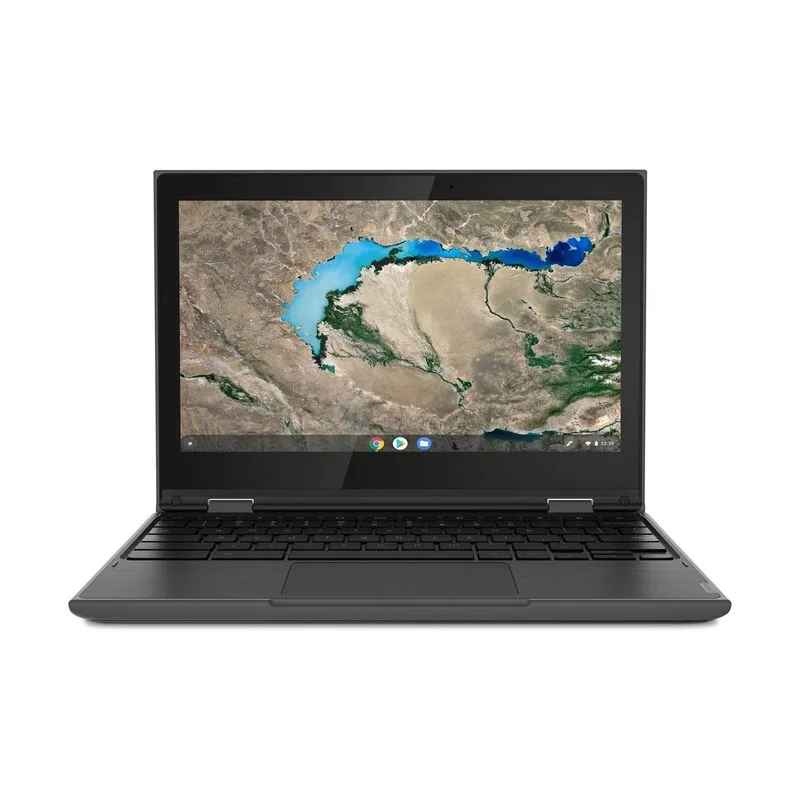
Image source: Lenovo
Lenovo 300e Chromebook (2nd Gen, Intel)
- Processor
- Intel Celeron N4020
- Everyday speed
- Fine for browsing and documents
- Graphics
- Intel UHD Graphics 600
- Gaming
- Not built for gaming
- Memory
- 4 GB
- Storage
- 32 GB eMMC
- Screen
- 11.6" HD IPS
- Operating system
- ChromeOS
Showing: Intel Celeron N4020 · 4 GB · 32 GB · part 81MB008DUS · 3 other configurations
- Processor
- Intel Celeron N4000
- Everyday speed
- Fine for browsing and documents
- Graphics
- Intel UHD Graphics 600
- Gaming
- Not built for gaming
- Memory
- 4 GB
- Storage
- 32 GB eMMC
- Screen
- 11.6" HD IPS
- Operating system
- ChromeOS
Showing: Intel Celeron N4000 · 4 GB · 32 GB · part 81MB0003US · Back to the base configuration
- Processor
- Intel Celeron N4120
- Everyday speed
- Fine for browsing and documents
- Graphics
- Intel UHD Graphics 600
- Gaming
- Not built for gaming
- Memory
- 4 GB
- Storage
- 32 GB eMMC
- Screen
- 11.6" HD IPS
- Operating system
- ChromeOS
Showing: Intel Celeron N4120 · 4 GB · 32 GB · part 81MB008EUS · Back to the base configuration
- Processor
- Intel Celeron N4120
- Everyday speed
- Fine for browsing and documents
- Graphics
- Intel UHD Graphics 600
- Gaming
- Not built for gaming
- Memory
- 8 GB
- Storage
- 64 GB eMMC
- Screen
- 11.6" HD IPS
- Operating system
- ChromeOS
Showing: Intel Celeron N4120 · 8 GB · 64 GB · part 81MB006RUS · Back to the base configuration
We earn a commission from qualifying Amazon purchases made through our links, at no extra cost to you. This never affects our specs. How we make money.
Choose a configuration
The Lenovo 300e Chromebook (2nd Gen, Intel) is sold in 4 configurations. Pick the specs you want and the whole page switches to that configuration.
Dashed options are sold in another configuration. Picking one switches the other specs to match.
| Processor | Memory | Storage | Part number | Actions |
|---|---|---|---|---|
| Intel Celeron N4020 | 4 GB | 32 GB | 81MB008DUS | Check current price (opens Amazon in a new tab) |
| Intel Celeron N4000 | 4 GB | 32 GB | 81MB0003US | Check current price (opens Amazon in a new tab) |
| Intel Celeron N4120 | 4 GB | 32 GB | 81MB008EUS | Check current price (opens Amazon in a new tab) |
| Intel Celeron N4120 | 8 GB | 64 GB | 81MB006RUS | Check current price (opens Amazon in a new tab) |
Lenovo 300e Chromebook (2nd Gen, Intel) at a glance
-
Performance
Web, email and documents
Expect it to cover email, browsing and light documents, and little beyond that.
-
Design
Flips into a tablet
The screen flips all the way around, so it works as a tablet for reading, or stands in tent mode for movies.
-
Who it suits
A simple first laptop
A starter laptop for homework, browsing and streaming.
-
Screen
Dim in a bright room
At 250 nits, it's dimmer than 78% of the laptops we list. Indoors it's fine, while daylight from a window makes it hard to read.
-
Performance
Web, email and documents
Expect it to cover email, browsing and light documents, and little beyond that.
-
Design
Flips into a tablet
The screen flips all the way around, so it works as a tablet for reading, or stands in tent mode for movies.
-
Who it suits
A simple first laptop
A starter laptop for homework, browsing and streaming.
-
Screen
Dim in a bright room
At 250 nits, it's dimmer than 78% of the laptops we list. Indoors it's fine, while daylight from a window makes it hard to read.
Lenovo 300e Chromebook (2nd Gen, Intel) full specifications
For the configuration with Intel Celeron N4020 · 4 GB · 32 GB · part 81MB008DUS. Change configuration
For the configuration with Intel Celeron N4020 · 4 GB · 32 GB · part 81MB008DUS. Change configuration
For the configuration with Intel Celeron N4000 · 4 GB · 32 GB · part 81MB0003US. Change configuration
For the configuration with Intel Celeron N4120 · 4 GB · 32 GB · part 81MB008EUS. Change configuration
For the configuration with Intel Celeron N4120 · 8 GB · 64 GB · part 81MB006RUS. Change configuration
Performance
Expect it to cover email, browsing and light documents, and little beyond that. Its 4 GB of memory only covers light browsing, and it's soldered, so it stays at that amount. The 32 GB drive fills up fast, so you'll lean on cloud storage for photos and files.
| Processor | Intel Celeron N4020Other configurations: Intel Celeron N4000, Intel Celeron N4120 |
|---|---|
| CPU cores | 2 |
| Threads | 2 |
| Base clock | 1.1 GHz |
| Max boost clock | 2.8 GHz |
| Cache | 4 MB |
| Processor base power | 6 W |
| Manufacturing process | 14 nm |
| Graphics | Intel UHD Graphics 600 |
| Memory (RAM) | 4 GBOther configurations: 8 GB |
| Memory type | LPDDR4-2400 |
| Memory upgrades | Soldered (not upgradeable) |
| Storage | 32 GBOther configurations: 64 GB |
| Storage type | eMMC |
| Storage interface | eMMC 5.1 |
Screen
Its 11.6-inch display is an IPS panel, so colors hold up when you look from the side. It's less sharp than 84% of the laptops we list, which makes small text look a bit fuzzy. It responds to touch, too.
| Screen size | 11.6" |
|---|---|
| Resolution | HD (1366 x 768) |
| Panel | IPS |
| Brightness | 250 nits |
| Finish | Matte |
| Touchscreen | Yes |
Battery and size
| Battery capacity | 42 Wh |
|---|---|
| Charger | 45 W |
| Charges via | USB-C |
| Materials | PC-ABS (Top), PC-ABS (Bottom) |
| Hinge | 360-degree convertible |
| Color | Black |
| Colors available | Black |
Ports and wireless
| Card reader | microSD |
|---|---|
| Wi-Fi | Wi-Fi 5 |
| Wi-Fi card | Intel 9560 |
| Bluetooth | Bluetooth 5.1 |
Features
The screen flips around into a tablet. The keyboard has no backlight, so typing in a dark room is harder.
| Webcam | 720p |
|---|---|
| Backlit keyboard | No |
| Keyboard | Non-backlit, English |
| Microphones | Mono |
| Security | Google Security Chip H1 |
Software and model
It runs ChromeOS, which boots fast and updates itself. Web and Android apps work, and Windows software doesn't install.
| Operating system | ChromeOS |
|---|---|
| Released | 2021 |
Performance
Expect it to cover email, browsing and light documents, and little beyond that. Its 4 GB of memory only covers light browsing, and it's soldered, so it stays at that amount. The 32 GB drive fills up fast, so you'll lean on cloud storage for photos and files.
| Processor | Intel Celeron N4000Other configurations: Intel Celeron N4020, Intel Celeron N4120 |
|---|---|
| CPU cores | 2 |
| Threads | 2 |
| Base clock | 1.1 GHz |
| Max boost clock | 2.6 GHz |
| Cache | 4 MB |
| Processor base power | 6 W |
| Manufacturing process | 14 nm |
| Graphics | Intel UHD Graphics 600 |
| Memory (RAM) | 4 GBOther configurations: 8 GB |
| Memory type | LPDDR4-2400 |
| Memory upgrades | Soldered (not upgradeable) |
| Storage | 32 GBOther configurations: 64 GB |
| Storage type | eMMC |
| Storage interface | eMMC 5.1 |
Screen
Its 11.6-inch display is an IPS panel, so colors hold up when you look from the side. It's less sharp than 84% of the laptops we list, which makes small text look a bit fuzzy. It responds to touch, too.
| Screen size | 11.6" |
|---|---|
| Resolution | HD (1366 x 768) |
| Panel | IPS |
| Brightness | 250 nits |
| Finish | Matte |
| Touchscreen | Yes |
Battery and size
| Battery capacity | 42 Wh |
|---|---|
| Charger | 45 W |
| Charges via | USB-C |
| Materials | PC-ABS (Top), PC-ABS (Bottom) |
| Hinge | 360-degree convertible |
| Color | Black |
| Colors available | Black |
Ports and wireless
| Card reader | microSD |
|---|---|
| Wi-Fi | Wi-Fi 5 |
| Wi-Fi card | Intel 9560 |
| Bluetooth | Bluetooth 5.1 |
Features
The screen flips around into a tablet. The keyboard has no backlight, so typing in a dark room is harder.
| Webcam | 720p |
|---|---|
| Backlit keyboard | No |
| Keyboard | Non-backlit, English |
| Microphones | Mono |
| Security | Google Security Chip H1 |
Software and model
It runs ChromeOS, which boots fast and updates itself. Web and Android apps work, and Windows software doesn't install.
| Operating system | ChromeOS |
|---|---|
| Released | 2021 |
Performance
This configuration has the Intel Celeron N4120. Expect it to cover email, browsing and light documents, and little beyond that. Its 4 GB of memory only covers light browsing, and it's soldered, so it stays at that amount. The 32 GB drive fills up fast, so you'll lean on cloud storage for photos and files. There's also a configuration with 8 GB of memory and a 64 GB drive, the one to pick for heavier apps or more at once.
| Processor | Intel Celeron N4120Other configurations: Intel Celeron N4020, Intel Celeron N4000 |
|---|---|
| CPU cores | 4 |
| Threads | 4 |
| Base clock | 1.1 GHz |
| Max boost clock | 2.6 GHz |
| Cache | 4 MB |
| Processor base power | 6 W |
| Manufacturing process | 14 nm |
| Graphics | Intel UHD Graphics 600 |
| Memory (RAM) | 4 GBOther configurations: 8 GB |
| Memory type | LPDDR4-2400 |
| Memory upgrades | Soldered (not upgradeable) |
| Storage | 32 GBOther configurations: 64 GB |
| Storage type | eMMC |
| Storage interface | eMMC 5.1 |
Screen
Its 11.6-inch display is an IPS panel, so colors hold up when you look from the side. It's less sharp than 84% of the laptops we list, which makes small text look a bit fuzzy. It responds to touch, too.
| Screen size | 11.6" |
|---|---|
| Resolution | HD (1366 x 768) |
| Panel | IPS |
| Brightness | 250 nits |
| Finish | Matte |
| Touchscreen | Yes |
Battery and size
| Battery capacity | 42 Wh |
|---|---|
| Charger | 45 W |
| Charges via | USB-C |
| Materials | PC-ABS (Top), PC-ABS (Bottom) |
| Hinge | 360-degree convertible |
| Color | Black |
| Colors available | Black |
Ports and wireless
| Card reader | microSD |
|---|---|
| Wi-Fi | Wi-Fi 5 |
| Wi-Fi card | Intel 9560 |
| Bluetooth | Bluetooth 5.1 |
Features
The screen flips around into a tablet. The keyboard has no backlight, so typing in a dark room is harder.
| Webcam | 720p |
|---|---|
| Backlit keyboard | No |
| Keyboard | Non-backlit, English |
| Microphones | Mono |
| Security | Google Security Chip H1 |
Software and model
It runs ChromeOS, which boots fast and updates itself. Web and Android apps work, and Windows software doesn't install.
| Operating system | ChromeOS |
|---|---|
| Released | 2021 |
Performance
This configuration has the Intel Celeron N4120. Expect it to cover email, browsing and light documents, and little beyond that. Its 8 GB of memory handles a few tabs and an office app at once, and it's soldered, so it stays at that amount. The 64 GB drive fills up fast, so you'll lean on cloud storage for photos and files.
| Processor | Intel Celeron N4120Other configurations: Intel Celeron N4020, Intel Celeron N4000 |
|---|---|
| CPU cores | 4 |
| Threads | 4 |
| Base clock | 1.1 GHz |
| Max boost clock | 2.6 GHz |
| Cache | 4 MB |
| Processor base power | 6 W |
| Manufacturing process | 14 nm |
| Graphics | Intel UHD Graphics 600 |
| Memory (RAM) | 8 GBOther configurations: 4 GB |
| Memory type | LPDDR4-2400 |
| Memory upgrades | Soldered (not upgradeable) |
| Storage | 64 GBOther configurations: 32 GB |
| Storage type | eMMC |
| Storage interface | eMMC 5.1 |
Screen
Its 11.6-inch display is an IPS panel, so colors hold up when you look from the side. It's less sharp than 84% of the laptops we list, which makes small text look a bit fuzzy. It responds to touch, too.
| Screen size | 11.6" |
|---|---|
| Resolution | HD (1366 x 768) |
| Panel | IPS |
| Brightness | 250 nits |
| Finish | Matte |
| Touchscreen | Yes |
Battery and size
| Battery capacity | 42 Wh |
|---|---|
| Charger | 45 W |
| Charges via | USB-C |
| Materials | PC-ABS (Top), PC-ABS (Bottom) |
| Hinge | 360-degree convertible |
| Color | Black |
| Colors available | Black |
Ports and wireless
| Card reader | microSD |
|---|---|
| Wi-Fi | Wi-Fi 5 |
| Wi-Fi card | Intel 9560 |
| Bluetooth | Bluetooth 5.1 |
Features
The screen flips around into a tablet. The keyboard has no backlight, so typing in a dark room is harder.
| Webcam | 720p |
|---|---|
| Backlit keyboard | No |
| Keyboard | Non-backlit, English |
| Microphones | Mono |
| Security | Google Security Chip H1 |
Software and model
It runs ChromeOS, which boots fast and updates itself. Web and Android apps work, and Windows software doesn't install.
| Operating system | ChromeOS |
|---|---|
| Released | 2021 |
Specs from Lenovo's published product information. Makers revise hardware between production runs, so check the part number before you buy. Spotted an error? Let us know.