




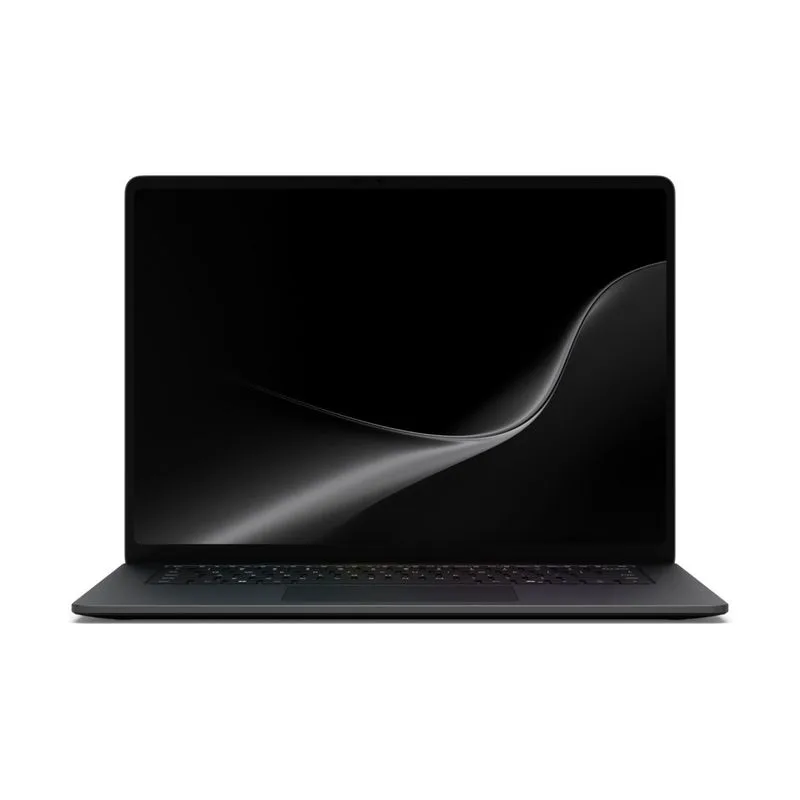
Image source: Microsoft
Microsoft Surface Laptop 15 (8th Edition)
- Processor
- Snapdragon X2 Plus
- Everyday speed
- Handles photo and video editing
- Graphics
- Qualcomm Adreno GPU
- Gaming
- Not built for gaming
- Memory
- 16 GB
- Storage
- 512 GB SSD
- Screen
- 15" 2K
- Weight
- 1.66 kg (3.7 lb)
- Battery (maker claim)
- Up to 19 hours
- Operating system
- Windows 11 Home
Showing: Snapdragon X2 Plus · 16 GB · 512 GB · part EP2-60881 · 5 other configurations
Colors: Platinum, Black
- Processor
- Snapdragon X2 Elite
- Everyday speed
- Handles heavy creative work
- Graphics
- Qualcomm Adreno GPU
- Gaming
- Not built for gaming
- Memory
- 16 GB
- Storage
- 512 GB SSD
- Screen
- 15" 2K
- Weight
- 1.66 kg (3.7 lb)
- Battery (maker claim)
- Up to 19 hours
- Operating system
- Windows 11 Home
Showing: Snapdragon X2 Elite · 16 GB · 512 GB · part EP2-60200 · Back to the base configuration
Colors: Platinum, Black
- Processor
- Snapdragon X2 Elite
- Everyday speed
- Handles heavy creative work
- Graphics
- Qualcomm Adreno GPU
- Gaming
- Not built for gaming
- Memory
- 16 GB
- Storage
- 1 TB SSD
- Screen
- 15" 2K
- Weight
- 1.66 kg (3.7 lb)
- Battery (maker claim)
- Up to 19 hours
- Operating system
- Windows 11 Home
Showing: Snapdragon X2 Elite · 16 GB · 1 TB · part EP2-60128 · Back to the base configuration
Colors: Platinum, Black
- Processor
- Snapdragon X2 Elite
- Everyday speed
- Handles heavy creative work
- Graphics
- Qualcomm Adreno GPU
- Gaming
- Not built for gaming
- Memory
- 24 GB
- Storage
- 512 GB SSD
- Screen
- 15" 2K
- Weight
- 1.66 kg (3.7 lb)
- Battery (maker claim)
- Up to 19 hours
- Operating system
- Windows 11 Home
Showing: Snapdragon X2 Elite · 24 GB · 512 GB · part EP2-60892 · Back to the base configuration
Colors: Platinum, Black
- Processor
- Snapdragon X2 Elite
- Everyday speed
- Handles heavy creative work
- Graphics
- Qualcomm Adreno GPU
- Gaming
- Not built for gaming
- Memory
- 32 GB
- Storage
- 1 TB SSD
- Screen
- 15" 2K
- Weight
- 1.66 kg (3.7 lb)
- Battery (maker claim)
- Up to 19 hours
- Operating system
- Windows 11 Home
Showing: Snapdragon X2 Elite · 32 GB · 1 TB · part EP2-60273 · Back to the base configuration
Colors: Platinum, Black
- Processor
- Snapdragon X2 Elite
- Everyday speed
- Handles heavy creative work
- Graphics
- Qualcomm Adreno GPU
- Gaming
- Not built for gaming
- Memory
- 64 GB
- Storage
- 1 TB SSD
- Screen
- 15" 2K
- Weight
- 1.66 kg (3.7 lb)
- Battery (maker claim)
- Up to 19 hours
- Operating system
- Windows 11 Home
Showing: Snapdragon X2 Elite · 64 GB · 1 TB · part EP2-60772 · Back to the base configuration
Colors: Platinum, Black
We earn a commission from qualifying Amazon purchases made through our links, at no extra cost to you. This never affects our specs. How we make money.
Choose a configuration
The Microsoft Surface Laptop 15 (8th Edition) is sold in 6 configurations. Pick the specs you want and the whole page switches to that configuration.
Dashed options are sold in another configuration. Picking one switches the other specs to match.
| Processor | Memory | Storage | Part number | Actions |
|---|---|---|---|---|
| Snapdragon X2 Plus | 16 GB | 512 GB | EP2-60881 | Check current price (opens Amazon in a new tab) |
| Snapdragon X2 Elite | 16 GB | 512 GB | EP2-60200, EP2-60211 | Check current price (opens Amazon in a new tab) |
| Snapdragon X2 Elite | 16 GB | 1 TB | EP2-60128, EP2-60139 | Check current price (opens Amazon in a new tab) |
| Snapdragon X2 Elite | 24 GB | 512 GB | EP2-60892, EP2-60893 | Check current price (opens Amazon in a new tab) |
| Snapdragon X2 Elite | 32 GB | 1 TB | EP2-60273, EP2-60284 | Check current price (opens Amazon in a new tab) |
| Snapdragon X2 Elite | 64 GB | 1 TB | EP2-60772 | Check current price (opens Amazon in a new tab) |
Microsoft Surface Laptop 15 (8th Edition) at a glance
-
Performance
Pick the power you need
It comes with the Snapdragon X2 Plus or Snapdragon X2 Elite. The Snapdragon X2 Plus handles demanding work like coding or photo editing, while the Snapdragon X2 Elite has power for heavy jobs like big code builds or virtual machines.
-
Battery
Long battery life
Microsoft claims up to 19 hours, which beats 75% of the laptops we list that publish a figure. Real days run shorter, but a workday away from an outlet is realistic.
-
Who it suits
One laptop for work and school
Work, school and heavier projects on one machine.
-
Screen
A crisp display
Its pixel density beats 74% of the laptops we list, which keeps small text and photos looking clean.
-
Performance
Pick the power you need
It comes with the Snapdragon X2 Plus or Snapdragon X2 Elite. The Snapdragon X2 Plus handles demanding work like coding or photo editing, while the Snapdragon X2 Elite has power for heavy jobs like big code builds or virtual machines.
-
Battery
Long battery life
Microsoft claims up to 19 hours, which beats 75% of the laptops we list that publish a figure. Real days run shorter, but a workday away from an outlet is realistic.
-
Who it suits
One laptop for work and school
Work, school and heavier projects on one machine.
-
Screen
A crisp display
Its pixel density beats 74% of the laptops we list, which keeps small text and photos looking clean.
Microsoft Surface Laptop 15 (8th Edition) full specifications
For the configuration with Snapdragon X2 Plus · 16 GB · 512 GB · part EP2-60881. Change configuration
For the configuration with Snapdragon X2 Plus · 16 GB · 512 GB · part EP2-60881. Change configuration
For the configuration with Snapdragon X2 Elite · 16 GB · 512 GB · part EP2-60200. Change configuration
For the configuration with Snapdragon X2 Elite · 16 GB · 1 TB · part EP2-60128. Change configuration
For the configuration with Snapdragon X2 Elite · 24 GB · 512 GB · part EP2-60892. Change configuration
For the configuration with Snapdragon X2 Elite · 32 GB · 1 TB · part EP2-60273. Change configuration
For the configuration with Snapdragon X2 Elite · 64 GB · 1 TB · part EP2-60772. Change configuration
Performance
This configuration has the Snapdragon X2 Plus. It's quick enough for serious work, like data analysis, coding or editing RAW photos. The 16 GB of memory keeps dozens of tabs and a few apps open at once. The 512 GB SSD covers apps, work files and a decent photo collection.
| Processor | Snapdragon X2 PlusOther configurations: Snapdragon X2 Elite |
|---|---|
| Graphics | Qualcomm Adreno GPU |
| AI engine (NPU) | 80 TOPS |
| Memory (RAM) | 16 GBOther configurations: 24 GB, 32 GB, 64 GB |
| Storage | 512 GBOther configurations: 1 TB |
| Storage type | SSD |
Screen
The 15-inch display is sharper than 74% of the laptops we list, so text and photos look crisp. It responds to touch, too.
| Screen size | 15" |
|---|---|
| Resolution | 2K (2496 x 1664) |
| Panel | LCD |
| HDR | HDR |
| Touchscreen | Yes |
Battery and size
Microsoft claims up to 19 hours, which beats 75% of the laptops we list that publish a figure. That's a best-case number, so plan on fewer hours with lots of tabs or video calls. At 3.7 lb (1.66 kg), it's fine to carry now and then.
| Battery life (maker claim) | Up to 19 hours |
|---|---|
| Charges via | Surface Connect |
| Weight | 1.66 kg (3.7 lb) |
| Color | PlatinumOther configurations: Black |
| Colors available | Platinum |
Ports and wireless
It has USB4 for a dock or external display, USB-A for flash drives or a mouse and a microSD slot for extra storage. Wi-Fi 7 is there for the newest routers.
| Ports | 2x USB-C / USB4, USB-A 3.2, MicroSDXC Express card reader, 3.5 mm audio jack, Surface Connect |
|---|---|
| Thunderbolt / USB4 | USB4 |
| Card reader | MicroSDXC Express |
| Wi-Fi | Wi-Fi 7 |
Features
Its webcam is sharp enough that you look clear on video calls.
| Webcam | 1080p Full HD |
|---|
Software and model
It runs Windows 11 Home on an Arm processor. Everyday apps run well, but check older programs, specialist software and games before you buy.
| Operating system | Windows 11 Home |
|---|
Performance
This configuration has the Snapdragon X2 Elite. Big builds, data crunching and multitrack audio are where this processor earns its keep. The 16 GB of memory keeps dozens of tabs and a few apps open at once. The 512 GB SSD covers apps, work files and a decent photo collection.
| Processor | Snapdragon X2 EliteOther configurations: Snapdragon X2 Plus |
|---|---|
| Graphics | Qualcomm Adreno GPU |
| AI engine (NPU) | 80 TOPS |
| Memory (RAM) | 16 GBOther configurations: 24 GB, 32 GB, 64 GB |
| Storage | 512 GBOther configurations: 1 TB |
| Storage type | SSD |
Screen
The 15-inch display is sharper than 74% of the laptops we list, so text and photos look crisp. It responds to touch, too.
| Screen size | 15" |
|---|---|
| Resolution | 2K (2496 x 1664) |
| Panel | LCD |
| HDR | HDR |
| Touchscreen | Yes |
Battery and size
Microsoft claims up to 19 hours, which beats 75% of the laptops we list that publish a figure. That's a best-case number, so plan on fewer hours with lots of tabs or video calls. At 3.7 lb (1.66 kg), it's fine to carry now and then.
| Battery life (maker claim) | Up to 19 hours |
|---|---|
| Charges via | Surface Connect |
| Weight | 1.66 kg (3.7 lb) |
| Color | PlatinumOther configurations: Black |
| Colors available | Platinum |
Ports and wireless
It has USB4 for a dock or external display, USB-A for flash drives or a mouse and a microSD slot for extra storage. Wi-Fi 7 is there for the newest routers.
| Ports | 2x USB-C / USB4, 1x USB-A 3.2, MicroSDXC Express card reader, 3.5 mm audio jack, Surface Connect |
|---|---|
| Thunderbolt / USB4 | USB4 |
| Card reader | MicroSDXC Express |
| Wi-Fi | Wi-Fi 7 |
Features
Its webcam is sharp enough that you look clear on video calls.
| Webcam | 1080p |
|---|
Software and model
It runs Windows 11 Home on an Arm processor. Everyday apps run well, but check older programs, specialist software and games before you buy.
| Operating system | Windows 11 Home |
|---|
Performance
This configuration has the Snapdragon X2 Elite. Big builds, data crunching and multitrack audio are where this processor earns its keep. The 16 GB of memory keeps dozens of tabs and a few apps open at once. The 1 TB SSD fits a large photo library or several big games. Need more? The configuration with 32 GB of memory is the step up for heavier apps or more at once.
| Processor | Snapdragon X2 EliteOther configurations: Snapdragon X2 Plus |
|---|---|
| Graphics | Qualcomm Adreno GPU |
| AI engine (NPU) | 80 TOPS |
| Memory (RAM) | 16 GBOther configurations: 24 GB, 32 GB, 64 GB |
| Storage | 1 TBOther configurations: 512 GB |
| Storage type | SSD |
Screen
The 15-inch display is sharper than 74% of the laptops we list, so text and photos look crisp. It responds to touch, too.
| Screen size | 15" |
|---|---|
| Resolution | 2K (2496 x 1664) |
| Panel | LCD |
| HDR | HDR |
| Touchscreen | Yes |
Battery and size
Microsoft claims up to 19 hours, which beats 75% of the laptops we list that publish a figure. That's a best-case number, so plan on fewer hours with lots of tabs or video calls. At 3.7 lb (1.66 kg), it's fine to carry now and then.
| Battery life (maker claim) | Up to 19 hours |
|---|---|
| Charges via | Surface Connect |
| Weight | 1.66 kg (3.7 lb) |
| Color | PlatinumOther configurations: Black |
| Colors available | Platinum |
Ports and wireless
It has USB4 for a dock or external display, USB-A for flash drives or a mouse and a microSD slot for extra storage. Wi-Fi 7 is there for the newest routers.
| Ports | 2x USB-C / USB4, 1x USB-A 3.2, MicroSDXC Express card reader, 3.5 mm audio jack, Surface Connect port |
|---|---|
| Thunderbolt / USB4 | USB4 |
| Card reader | MicroSDXC Express |
| Wi-Fi | Wi-Fi 7 |
Features
Its webcam is sharp enough that you look clear on video calls.
| Webcam | 1080p |
|---|
Software and model
It runs Windows 11 Home on an Arm processor. Everyday apps run well, but check older programs, specialist software and games before you buy.
| Operating system | Windows 11 Home |
|---|
Performance
This configuration has the Snapdragon X2 Elite. Big builds, data crunching and multitrack audio are where this processor earns its keep. The 24 GB of memory keeps dozens of tabs and a few apps open at once. The 512 GB SSD covers apps, work files and a decent photo collection. Need more? The configuration with 32 GB of memory and a 1 TB drive is the step up for heavier apps or more at once.
| Processor | Snapdragon X2 EliteOther configurations: Snapdragon X2 Plus |
|---|---|
| Graphics | Qualcomm Adreno GPU |
| AI engine (NPU) | 80 TOPS |
| Memory (RAM) | 24 GBOther configurations: 16 GB, 32 GB, 64 GB |
| Storage | 512 GBOther configurations: 1 TB |
| Storage type | SSD |
Screen
The 15-inch display is sharper than 74% of the laptops we list, so text and photos look crisp. It responds to touch, too.
| Screen size | 15" |
|---|---|
| Resolution | 2K (2496 x 1664) |
| Panel | LCD |
| HDR | HDR |
| Touchscreen | Yes |
Battery and size
Microsoft claims up to 19 hours, which beats 75% of the laptops we list that publish a figure. That's a best-case number, so plan on fewer hours with lots of tabs or video calls. At 3.7 lb (1.66 kg), it's fine to carry now and then.
| Battery life (maker claim) | Up to 19 hours |
|---|---|
| Charges via | Surface Connect |
| Weight | 1.66 kg (3.7 lb) |
| Color | BlackOther configurations: Platinum |
| Colors available | Black |
Ports and wireless
It has USB4 for a dock or external display, USB-A for flash drives or a mouse and a microSD slot for extra storage. Wi-Fi 7 is there for the newest routers.
| Ports | 2x USB-C / USB4, USB-A 3.2, MicroSDXC Express card reader, 3.5 mm audio jack, Surface Connect port |
|---|---|
| Thunderbolt / USB4 | USB4 |
| Card reader | MicroSDXC Express |
| Wi-Fi | Wi-Fi 7 |
Features
Its webcam is sharp enough that you look clear on video calls.
| Webcam | 1080p |
|---|
Software and model
It runs Windows 11 Home on an Arm processor. Everyday apps run well, but check older programs, specialist software and games before you buy.
| Operating system | Windows 11 Home |
|---|
Performance
This configuration has the Snapdragon X2 Elite. Big builds, data crunching and multitrack audio are where this processor earns its keep. The 32 GB of memory leaves plenty of room for big projects and lots of open apps. The 1 TB SSD fits a large photo library or several big games. Need more? The configuration with 64 GB of memory is the step up for heavier apps or more at once.
| Processor | Snapdragon X2 EliteOther configurations: Snapdragon X2 Plus |
|---|---|
| Graphics | Qualcomm Adreno GPU |
| AI engine (NPU) | 80 TOPS |
| Memory (RAM) | 32 GBOther configurations: 16 GB, 24 GB, 64 GB |
| Storage | 1 TBOther configurations: 512 GB |
| Storage type | SSD |
Screen
The 15-inch display is sharper than 74% of the laptops we list, so text and photos look crisp. It responds to touch, too.
| Screen size | 15" |
|---|---|
| Resolution | 2K (2496 x 1664) |
| Panel | LCD |
| HDR | HDR |
| Touchscreen | Yes |
Battery and size
Microsoft claims up to 19 hours, which beats 75% of the laptops we list that publish a figure. That's a best-case number, so plan on fewer hours with lots of tabs or video calls. At 3.7 lb (1.66 kg), it's fine to carry now and then.
| Battery life (maker claim) | Up to 19 hours |
|---|---|
| Charges via | Surface Connect |
| Weight | 1.66 kg (3.7 lb) |
| Color | PlatinumOther configurations: Black |
| Colors available | Platinum |
Ports and wireless
It has USB4 for a dock or external display, USB-A for flash drives or a mouse and a microSD slot for extra storage. Wi-Fi 7 is there for the newest routers.
| Ports | 2x USB-C / USB4, 1x USB-A 3.2, microSDXC Express card reader, 3.5 mm audio jack, Surface Connect |
|---|---|
| Thunderbolt / USB4 | USB4 |
| Card reader | MicroSDXC Express |
| Wi-Fi | Wi-Fi 7 |
Features
Its webcam is sharp enough that you look clear on video calls.
| Webcam | 1080p |
|---|
Software and model
It runs Windows 11 Home on an Arm processor. Everyday apps run well, but check older programs, specialist software and games before you buy.
| Operating system | Windows 11 Home |
|---|
Performance
This configuration has the Snapdragon X2 Elite. Big builds, data crunching and multitrack audio are where this processor earns its keep. The 64 GB of memory leaves plenty of room for big projects and lots of open apps. The 1 TB SSD fits a large photo library or several big games. A configuration with 32 GB of memory covers lighter use.
| Processor | Snapdragon X2 EliteOther configurations: Snapdragon X2 Plus |
|---|---|
| Graphics | Qualcomm Adreno GPU |
| AI engine (NPU) | 80 TOPS |
| Memory (RAM) | 64 GBOther configurations: 16 GB, 24 GB, 32 GB |
| Storage | 1 TBOther configurations: 512 GB |
| Storage type | SSD |
Screen
The 15-inch display is sharper than 74% of the laptops we list, so text and photos look crisp. It responds to touch, too.
| Screen size | 15" |
|---|---|
| Resolution | 2K (2496 x 1664) |
| Panel | LCD |
| HDR | HDR |
| Touchscreen | Yes |
Battery and size
Microsoft claims up to 19 hours, which beats 75% of the laptops we list that publish a figure. That's a best-case number, so plan on fewer hours with lots of tabs or video calls. At 3.7 lb (1.66 kg), it's fine to carry now and then.
| Battery life (maker claim) | Up to 19 hours |
|---|---|
| Charges via | Surface Connect |
| Weight | 1.66 kg (3.7 lb) |
| Color | BlackOther configurations: Platinum |
| Colors available | Black |
Ports and wireless
It has USB4 for a dock or external display, USB-A for flash drives or a mouse and a microSD slot for extra storage. Wi-Fi 7 is there for the newest routers.
| Ports | 2x USB-C / USB4, 1x USB-A 3.2, MicroSDXC Express card reader, 3.5 mm audio jack, Surface Connect |
|---|---|
| Thunderbolt / USB4 | USB4 |
| Card reader | microSDXC Express |
| Wi-Fi | Wi-Fi 7 |
Features
Its webcam is sharp enough that you look clear on video calls.
| Webcam | 1080p |
|---|
Software and model
It runs Windows 11 Home on an Arm processor. Everyday apps run well, but check older programs, specialist software and games before you buy.
| Operating system | Windows 11 Home |
|---|
Specs from Microsoft's published product information. Makers revise hardware between production runs, so check the part number before you buy. Spotted an error? Let us know.